Direct Download Links vs. File-Sharing Links: What's the Difference?
Oct 27, 2026 07:21 AM
Kaushik Sampat
Sharing files online is easier when you understand the different types of links available. A direct download link and a file-sharing link may look similar, but they can work differently depending on the service providing them.
Understanding this difference can help you choose a convenient way to send documents, photographs, videos, and other digital files.
What Is a Direct Download Link?
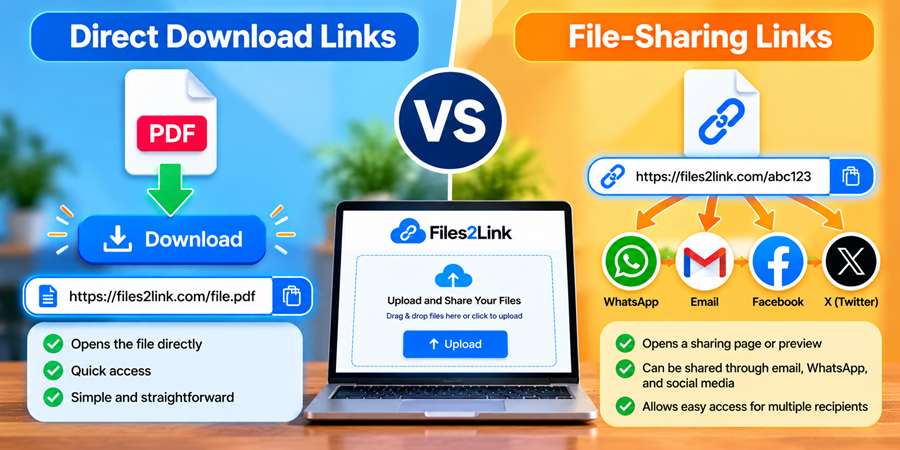
A direct download link points directly to a file. When someone opens it, their browser may start downloading the file or display it, depending on the file format and browser settings.
For example, a direct link to a PDF may open the document in a browser, while a link to a ZIP archive may begin downloading it.
Direct download links are useful when the recipient needs quick access to a particular file without navigating through a separate sharing page.
What Is a File-Sharing Link?
A file-sharing link provides a way to share access to a file online. Depending on the service, it may open a webpage where the recipient can view, preview, or download the file.
File-sharing links can be convenient when you want to send a file through email, WhatsApp, or another messaging platform instead of attaching it directly.
Key Differences Between the Two
How they open: A direct download link points to the file itself, whereas a file-sharing link may lead to a webpage or sharing interface.
User experience: Direct links can provide quick access to a file. Sharing links may offer additional information or options, depending on the service.
How you share: Both types can be sent through email and messaging platforms, provided the recipient can access the link.
Availability: The link's availability depends on the service, file location, and any expiry or access settings.
How Files2Link.com Can Help
Files2Link.com provides a way to upload files and create shareable links. Instead of repeatedly attaching the same file to different messages, you can copy a generated link and share it with the intended recipient.
To get started, visit the website, click Upload, select a supported file, and follow the on-screen instructions to generate your link.
Before sharing, check the link's availability and any applicable expiry settings. Test the link to make sure it works as expected.
Frequently Asked Questions
1. Is a direct download link the same as a file-sharing link?
Not necessarily. A direct download link points to a file, while a file-sharing link may open a page that provides access to it. The exact behaviour depends on the service.
2. Can I share file links through WhatsApp or email?
Yes, you can share accessible links through WhatsApp, email, and other suitable messaging platforms.
3. Which type of link should I use?
Choose the link that best suits your recipient's needs. Consider ease of access, link availability, and any privacy requirements.
Conclusion
Direct download links and file-sharing links both make sharing digital files easier, but they can provide different user experiences. Understanding the distinction helps you choose the appropriate method for each situation.
Visit Files2Link.com to explore a convenient way to upload files and create shareable links.
Login or create account to leave comments
Popular articles
How to Create a Shareable Link for Word Documents
Oct 27, 2026 07:48 AM
How to Choose the Right Online File-Sharing Tool
Oct 29, 2026 07:39 AM
Common File Formats Explained
Oct 29, 2026 07:34 AM
How to Convert Any File into a Shareable Link
Oct 27, 2026 05:31 AM
Direct Download Links vs. File-Sharing Links: What's the Dif...
Oct 27, 2026 07:21 AM
Categories
Comments (0)