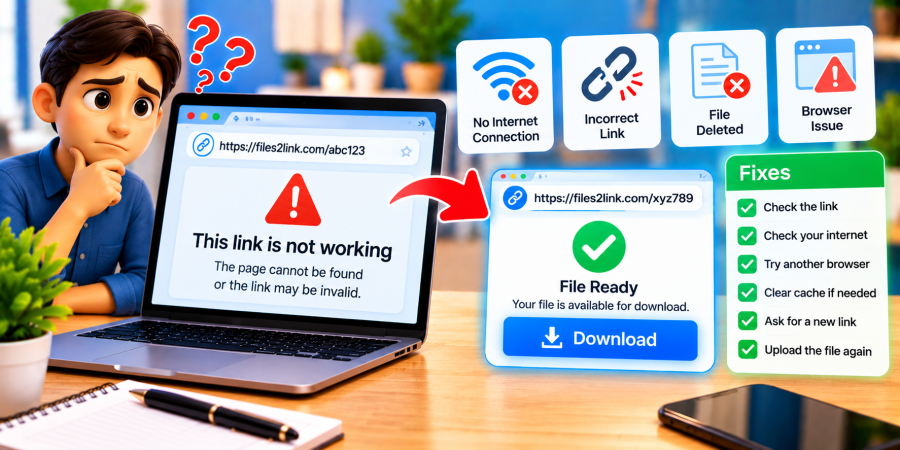
File-Sharing Link Not Working: Problems and Fixes
Oct 29, 2026 06:43 AM
Kaushik Sampat
File-Sharing Link Not Working: Problems and Fixes
A file-sharing link should make it easy to send documents, photos, videos, and other files. However, sometimes a link will not open, a download will fail, or the recipient will see an error message. If you are experiencing these problems with Files2Link.com or another file-sharing service, try the following solutions to identify and fix the issue.
Why Is Your File-Sharing Link Not Working?
A link may fail because it was copied incorrectly, the internet connection is unstable, the file is unavailable, or the sharing website is experiencing a temporary problem. Browser settings and access restrictions can also prevent a successful download.
How to Fix a File-Sharing Link That Does Not Work
1. Check the Link Address
Make sure you copied the complete link. Missing characters, extra spaces, or an incomplete address may prevent the page from opening. Copy the link again from the original message and paste it directly into your browser’s address bar.
2. Check Your Internet Connection
Open another trusted website to see whether your internet connection is working. If other pages also fail to load, reconnect to your network or restart your router if necessary. Try opening the file link again once the connection is stable.
3. Refresh the Page or Try Another Browser
A temporary browser issue may stop a link from loading correctly. Refresh the page and try again. If the problem continues, open the link in another updated browser. You can also try a private browsing window to check whether an extension or stored website data is causing the issue.
4. Check Whether the File Is Available
The file may have been deleted, moved, or made unavailable by the person who uploaded it. The service may also have temporary technical problems. If you cannot access the file, contact the sender and request a fresh link or confirmation that the file is still available.
5. Check the Download Requirements
Some services impose file-size limits, supported-format requirements, or access restrictions. If a download fails, review any error message and follow the website’s instructions. If you uploaded the file yourself, check the current upload requirements before trying again.
6. Check Browser Security and Downloads
Your browser may block a download that it considers unsafe. Review the warning carefully and download files only when you trust the source. Do not bypass security warnings for unfamiliar files or install unknown software to access a link.
7. Upload the File Again if Necessary
If you created the link but the file still cannot be accessed, revisit Files2Link.com and follow the available upload instructions. If the upload did not finish successfully, try uploading the file again and copy the newly generated link, if provided.
Conclusion
A file-sharing link that does not work is often caused by an incomplete URL, a connection problem, an unavailable file, or a download restriction. Check each possibility one at a time, test the link again, and contact the sender when necessary. These simple steps can help you resolve common file-sharing problems and share files more reliably.
Login or create account to leave comments
Popular articles
How to Create a Shareable Link for Word Documents
Oct 27, 2026 07:48 AM
How to Choose the Right Online File-Sharing Tool
Oct 29, 2026 07:39 AM
Common File Formats Explained
Oct 29, 2026 07:34 AM
How to Convert Any File into a Shareable Link
Oct 27, 2026 05:31 AM
Direct Download Links vs. File-Sharing Links: What's the Dif...
Oct 27, 2026 07:21 AM
Categories
Comments (0)