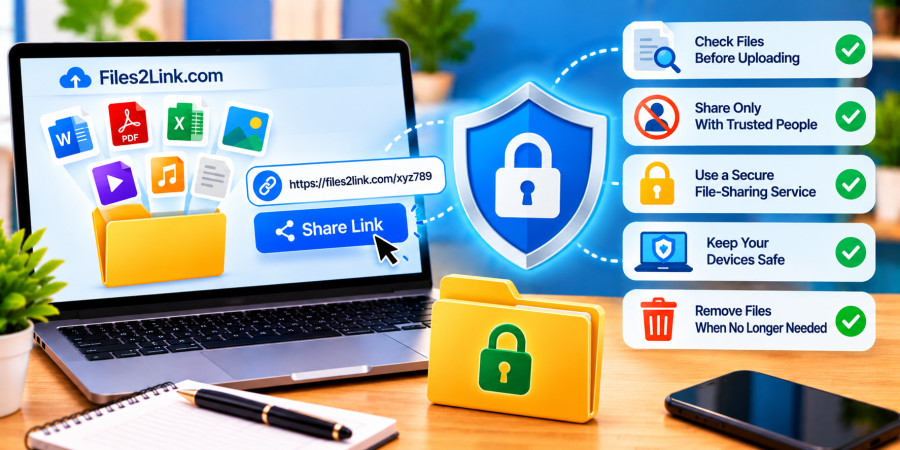
How to Protect Your Privacy When Sharing Files
Oct 29, 2026 06:47 AM
Kaushik Sampat
How to Protect Your Privacy When Sharing Files
Sharing files online is convenient, but it is important to protect your personal information when sending documents, photos, videos, and other files. A shared link can make file distribution easier, but it may also allow unintended people to access your content. When using Files2Link.com, follow the available upload instructions and take these simple precautions before sharing a file.
Why Is Privacy Important When Sharing Files?
Files can contain personal details, financial records, work documents, private photographs, or confidential information. If you share the wrong file or send a link to the wrong person, your information could reach someone who should not see it.
Protecting your privacy starts with checking what you share, choosing trustworthy services, and controlling who receives the link whenever access controls are available.
7 Ways to Protect Your Privacy When Sharing Files
1. Check Files Before Uploading
Open the file before uploading it. Check documents for personal addresses, account details, hidden comments, or information that should remain confidential. Review photos and screenshots for visible passwords, identity documents, and other private details. Remove unnecessary information before sharing.
2. Share Only What Is Necessary
Avoid uploading an entire folder when the recipient needs only one document. Select the specific files required for the task. Sharing fewer files reduces the chance of accidentally exposing unrelated personal or business information.
3. Use a Trusted File-Sharing Service
Choose a service with clear policies and understandable security information. Before uploading sensitive content, check the website’s privacy policy, file-handling practices, and available access or deletion options. Do not assume that every sharing service provides password protection, link expiry, or restricted access.
4. Send Links to the Right People
Double-check the recipient before sending a link through email or a messaging application. Avoid posting links publicly when the files contain private information. Remember that anyone who obtains a link may be able to access the file, depending on the service’s settings.
5. Protect Confidential Documents
When appropriate, remove sensitive details or create a redacted copy before uploading. For highly confidential files, consider an approved sharing method that offers suitable access controls. If you use an encrypted, password-protected archive, send its password through a separate trusted channel.
6. Use Secure Devices and Connections
Keep your browser, operating system, and security software updated. Avoid uploading confidential files on shared or public computers. When using public Wi-Fi, prefer a trusted connection and never ignore browser security warnings.
7. Remove Files When They Are No Longer Needed
Check whether the sharing service provides a way to delete uploaded files or disable existing links. Remove shared files when appropriate, and remember that deleting an online copy cannot guarantee that recipients have not already downloaded it.
Conclusion
Protecting your privacy when sharing files begins with checking your content, choosing a suitable service, and sending links carefully. Files2Link.com can help you share files through links, but your privacy also depends on the information you upload and the service’s available controls. Follow these precautions to reduce unnecessary exposure and share files more responsibly.
Login or create account to leave comments
Popular articles
How to Create a Shareable Link for Word Documents
Oct 27, 2026 07:48 AM
How to Choose the Right Online File-Sharing Tool
Oct 29, 2026 07:39 AM
Common File Formats Explained
Oct 29, 2026 07:34 AM
How to Convert Any File into a Shareable Link
Oct 27, 2026 05:31 AM
Direct Download Links vs. File-Sharing Links: What's the Dif...
Oct 27, 2026 07:21 AM
Categories
Comments (0)