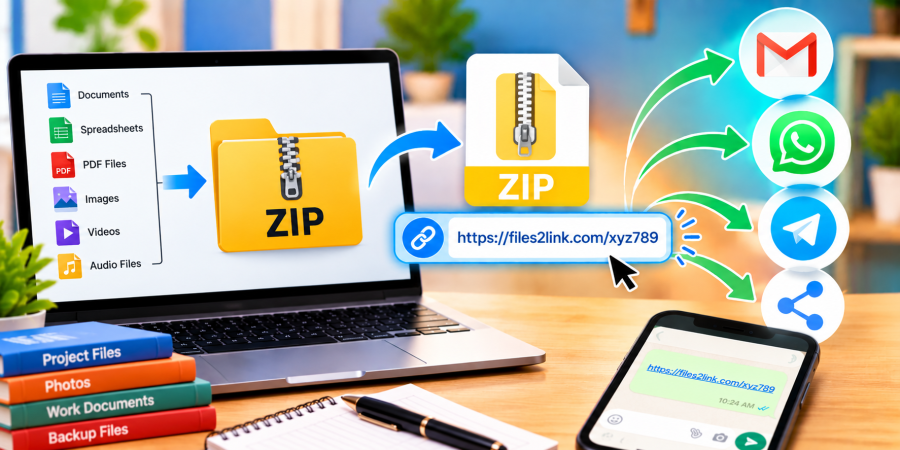
How to Share ZIP Files for Easy Downloading
Oct 29, 2026 06:29 AM
Kaushik Sampat
How to Share ZIP Files for Easy Downloading
ZIP files let you bundle documents, photos, videos, and other files into a single archive. Instead of attaching each item separately to an email, you can upload the archive and share a link. Visit Files2Link.com, follow the upload instructions, and copy the shareable link.
Why Share ZIP Files Using a Link?
A ZIP archive keeps related files together, making them easier to organise and send. You might bundle project documents, photographs, or work materials into one file. Sharing a link is convenient when email attachments are too large or several people need the same archive.
Recipients can download the archive and extract it using a built-in tool or compatible ZIP application.
How to Share ZIP Files with Files2Link.com
Step 1: Create and Check Your ZIP File
Select the files you want to share and compress them using your computer’s built-in option or a trusted archive tool. Give the archive a clear name, such as “Project-Documents.zip.” Check that it opens correctly and contains only the files you intend to share.
Step 2: Open Files2Link.com
Visit Files2Link.com in your browser. Follow the on-screen instructions to upload your ZIP file. Check the website’s current upload limits if the archive is large or the upload does not start.
Step 3: Copy the Shareable Link
After the upload finishes, follow the website’s instructions to obtain the file link. Copy it carefully and keep the original ZIP archive on your device as a backup.
Step 4: Send the Link
Paste the link into an email, WhatsApp message, or another communication platform. Add a short note describing the archive so recipients know what they are downloading. You can share the same link with each intended recipient instead of repeatedly attaching the file.
Step 5: Test the Link
Before sharing it widely, open the link yourself or ask a trusted recipient to test it. Confirm that it leads to the correct file and that the download works. Access may depend on the service’s features and policies.
Tips for Sharing ZIP Files Safely
Check the contents before uploading. Do not include passwords, confidential documents, personal information, or files you lack permission to distribute. A shareable link should not automatically be treated as private; others may access it if they obtain the link, depending on the service’s settings.
If the ZIP file is too large, remove unnecessary items or split the archive into smaller parts with a trusted tool. If a password is required, share it through a separate, appropriate channel. Avoid opening ZIP archives from unknown senders unless you can verify that they are trustworthy.
Conclusion
Sharing a ZIP file through a link can simplify sending multiple files together. With Files2Link.com, you can upload an archive, copy its link, and send it through your preferred communication platform. Check the archive, test the link, and protect sensitive information before sharing.
Login or create account to leave comments
Popular articles
How to Create a Shareable Link for Word Documents
Oct 27, 2026 07:48 AM
How to Choose the Right Online File-Sharing Tool
Oct 29, 2026 07:39 AM
Common File Formats Explained
Oct 29, 2026 07:34 AM
How to Convert Any File into a Shareable Link
Oct 27, 2026 05:31 AM
Direct Download Links vs. File-Sharing Links: What's the Dif...
Oct 27, 2026 07:21 AM
Categories
Comments (0)